Showing posts with label SharePoint. Show all posts

Saturday, September 15, 2012

How to: Insert AsemblyFileName in C# Code

Ever get burned by a cached assembly? I just did recently and it was no fun.

There is nothing worse than troubleshooting an issue you have already resolved. In my case I was working on a Custom Retention Policy and after troubleshooting for far longer than I would like to admit, I realized that when I initiated the retention policy date calculation it would work fine (this uses the W3WP.exe process) but when the Expiration Policy Timer Job ran it didn't work as expected (that timer job runs under the context of the OWSTimer.exe) so the OWSTimer had cached my code and was running old code.  I restarted the OWSTimer and just like magic all was well.

So I posed a question to myself, how can I know exactly what version of your code I am running? Sure you can right click on the assembly and check the properties there but that doesn't mean that is what the timer service is running for example. Entering a version number in your code can be a great way of ensuring that you are running the latest and (hopefully greatest) version of your code.

This is what I ended up with...this will take the AssemblyFileVersion from the AssemblyInfo.cs file:
   1: using System.Reflection;
   2: ...
   3:
   4: Version fileVersion = new Version("0.0.0.0");
   5: AssemblyFileVersionAttribute[] fileVersionAttributes = (AssemblyFileVersionAttribute[])Assembly.GetExecutingAssembly().GetCustomAttributes(typeof(AssemblyFileVersionAttribute), true);
   6: if (fileVersionAttributes != null && fileVersionAttributes.Length > 0)
   7: {
   8:     fileVersion = new Version(fileVersionAttributes[0].Version);
   9: }
  10: string workflowVersion = "Workflow Version: " + fileVersion;
You can then take that string and output it in a ULS Log entry for example.

Next step...Use TFS to increment the AssemblyFileVersion durring the build ;)

Wednesday, August 29, 2012

Unable to find the default edit form for list...

So Exporting a Site as a Template and Importing it into Visual Studio can be very useful but only if it works!

I was trying to use this method to create a List and a Library Instance so I could include it into my existing solution.  I did this and it appeared as though everything worked well until I tried to upload a document in the library or create a new list item...then I would get a nasty error about
"Unable to find the default edit form for list My List"
So I looked back in the definition and for the list there was this SharePoint Module inside that was named 'Listslist_name_here_pages'and had a Elements.xml inside it with some information about the DispForm, NewForm and EditForm...

Perfect, so for the list I included this module just as it was in the other solution and low and behold it worked...but then the Library didn't have a module inside it...WTF!!! Then some more snooping lead me to see that there was a Modules folder that had 4 Modules with the corresponding names each with their own different Elements.xml files!
LibraryNameForms_1033_STS_doctemp_word
LibraryNameForms_Features_DocumentLibrary_doclib
LibraryNameForms_pages
LibraryNameFormsMy Custom ContentType_1033_STS_doctemp_word
NASTY!!!

So, being a slave to SharePoint I set out to duplicate these four modules just as they were in the imported solution...no dice...but then I got to thinking about how this works and I snooped into the Scheme.xml of the list instance and found this....
<Forms />
What?!? that's not right...so I blew away all my precious modules I worked so hard on and switched the above one line in the Scheme.xml for this...
<Forms>
  <Form Type="DisplayForm" Url="DispForm.aspx" SetupPath="pages\form.aspx" WebPartZoneID="Main" />
  <Form Type="EditForm" Url="EditForm.aspx" SetupPath="pages\form.aspx" WebPartZoneID="Main" />
  <Form Type="NewForm" Url="NewForm.aspx" SetupPath="pages\form.aspx" WebPartZoneID="Main" />
</Forms>
WOW! Its magic! just like It should be...and a much nicer, cleaner solution.

More information about the Scheme.xml can be found here

Friday, July 27, 2012

Ode to SharePoint Designer

Just a little fun here...
You have the right to use SharePoint Designer,
Anything you save or modify will not be backed up.
Some unexpected results are to be expected.
If you cannot afford a Developer, then you may not wish to proceed.
Do you understand these flaws as I have described them to you?
Just kidding SPD...but seriously, stop trying to help...if I wanted your silly __designer:Preview tags then i would ask for them.


If you got here via search looking for answers I am sorry...try these sites:
SharePoint Designer 2010 inserts "__designer:Preview" and "__designer:Values" attributes upon reopening of Master Pages
Sharepoint Designer 2010 adding/generating __designer preview tags – a fix to solve this issue

Monday, July 16, 2012

SharePoint 2010: No Site Content Types Link

One of the most discuraging issues you will find when working with Content Types in SharePoint is a very simple issue. The Site Content Types link in the breadcrumb is not a link at all. Instead it is some grayed out text that irritates you every time you try an click on it.

So I got tired of trying to do this and thought I would take matters into my own hands.

Here is what I came up with:
function AddContentTypeLink() { 
   var spans = document.getElementsByTagName('h2'); 
   var stringToMatch = ' Site Content Types '; 
   for (var i = 0; i &lt; spans.length; ++i) { 
     if (spans[i].innerHTML.indexOf(stringToMatch) != -1) { 
       spans[i].innerHTML = spans[i].innerHTML.replace(stringToMatch ,"<a href='/_layouts/mngctype.aspx'>" + stringToMatch + "</a>"); 
       break;
     }
   }
 }
 _spBodyOnLoadFunctionNames.push('AddContentTypeLink');

Add this to an existing JavaScript file you have on the go (or in a CEWP on the settings pages where it exists if you are desperate)

If all worked properly you should be left with this:

It may not be pretty but it works well...

If you are working in a different language you can change the string variable to whatever it translates to (French for example is " Types de contenu de site " (don't forget the leading and trailing space!)

Saturday, July 7, 2012

SharePoint 2010 Search Refinement Panel - Bad Border

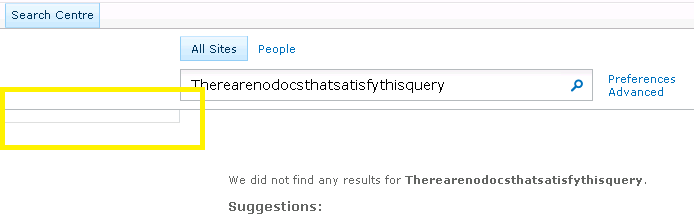
If you have ever spent time customizing or even just using SharePoint's Search Center then i am sure you have seen this annoying little box that shows up when you have no refinements. It also shows up when you get no results back from a query like this:

So, what is this? You may ask...Well it is the border of the Refinement Panel DIV which has padding-bottom: 5px and padding-top: 7px and it looks good when there are refinement items but not so much when it is empty...

Well that's great but what can we do?
Well, if you already have a JavaScript file and a jQuery refference, then throw this in there and it will hide it when it is blank...
 function HideEmptyRefiner() {  
      if ( $('.ms-searchref-main').children().length == 0 ) {    
        $('.ms-searchref-main').hide();   
      }  
 }  
_spBodyOnLoadFunctionNames.push('HideEmptyRefiner');  

So, what if you don't want to run jQuery on your site? Well don't worry i won't leave you hanging...you can achieve the same result with plain old JavaScript but as always it is 10 times harder!

I am not going to go into the details (you can find those here on this great blog about the issue) but you have to be careful on how you look to see if there are any childNodes. You can't just do a simple parent.childNodes.length because SharePoint was so kind as to leave a nice little XML comment in this DIV:
 <!-- l version="1.0" encoding="utf-8 -->  

Further more, the childNodes length count is not always consistent cross-browser

So, by using the knowledge gained from the blog above and his example as a starting point this is what i came up with...
 var kids;  
 var realKids;  
 var parent;  
 var i = 0;  
 function hideEmptySearchDiv() {  
   realKids = 0;  
   parent = document.getElementById("SRCHREF");  
   kids = parent.childNodes.length;  
   while (i < kids) {  
     if (parent.childNodes[i].nodeType != 3 && parent.childNodes[i].nodeType != 8) {  
       realKids++;  
     }  
     i++;  
   }  
   if (realKids == 0) {  
     parent.style.display = 'none';  
   }  
 }  
 _spBodyOnLoadFunctionNames.push('hideEmptySearchDiv');  

I found that the nodeType of the comment was 8 so I excluded that, then applied the same "if none found hide the div" logic as I used in my jQuery example above.

Enjoy! I hope this helps some one.

Wednesday, July 4, 2012

SharePoint 2010: Value does not fall within the expected range

Today I was working on a very annoying issue related to some custom code we are using to look-up information from a list.


All of a sudden when logged in as a non-Site Collection Administrator (Site Owner) our code was erroring out on this line:
 SPFieldUserValueCollection siteContacts = new SPFieldUserValueCollection(web, item["Site Contacts"].ToString());  


The error was basically saying that the 'Site Contacts' field did not exist in the list even tough it did.


Come to find out that this issue was not related to the list at all but rather the way that SharePoint gets list items. It does it in a CAML Query type of way thus the list item threshold of 8 columns applies and this column was magic number 9.


So because the list item threshold does not apply to Site Collection Admins the look-up worked fine for them but not for anyone else.


Lesson learned, increase the List View Threshold, perform a specific query on the list using SPQuery and specify less than 8 ViewFields something like this or override the limit like this:
 query.QueryThrottleMode = SPQueryThrottleOption.Override  


Or, in our case, we took a different (3rd) approach.


You can disable the throttling on a list by list basis so we opted for this PowerShell script:
 $web = Get-SPWeb http://your.site.com  
 $list = $web.Lists["My List"]   
 $list.EnableThrottling = $false  
 $list.Update()  


We knew this 'special' list is not going to get out of hand and we didn't want to change the threshold for the whole web application.

Thursday, June 28, 2012

Hide something from the SharePoint Dialog Box

Today I went onto a SharePoint site to Upload A file and saw this in the Dialog Box to upload a file.

Notice the Support Div That is floating on the Right of the page but then is also on the Dialog Box.


SharePoint uses the same Master Page for Dialog Boxes as it does for your site so if you add something to the master page it will most likely show up in your dialog boxes as well.


To resolve this issue you need to know about a "special" CSS class SharePoint uses.


It is s4-notdlg Any item in the master page that has this class is stripped out of the dialog boxes automatically by SharePoint.


So instead of like this:

 <div title="Support" class="supportTab " id="supportTab">  
 Support  
 </div>  

It should be like this:

 <div title="Support" class="supportTab s4-notdlg" id="supportTab">  
 Support  
 </div>  

Extra credit if you add the noindex so search doesn't find the word Support on every page in your Site:

 <div title="Support" class="supportTab s4-notdlg noindex" id="supportTab">  
 Support  
 </div>  

Wednesday, June 27, 2012

list.Fields["Internal Name"] does not exist

Got a quick and dirty one for you.

A co-worker of mine came to me with a simple but weird issue.
This chunk of code wasn't working:

 string property = "DocumentSetDescription";  
 if (list.Fields.ContainsField(property))  
 {  
   if (list.Fields[property].Type == SPFieldType.Invalid)  
   {  
     //Code Here  
   }  
 }  

But it was throwing an error on the second 'if' statement basically saying the Field did not exist.

So you would think that if the first if statement was true then the second must be OK as well but it wasn't.

Come to find out it has to do with the way that the SPList.Fields Property looks up fields.

if you use .Fields.ContainsField(value) it looks it up by the internal name of the field (which were had) but if you use .Fields[value] it tries to look it up by either the GUID, DisplayName or the iIndex.

So if you try to look up a column by the Internal Name and it isn't the same as the Display Name then it will fail.

In order to avoid this we refined the if statement to be more like this:

 string property = "DocumentSetDescription";  
 if (list.Fields.ContainsField(property))  
 {  
   if (list.Fields.GetFieldByInternalName(property).Type == SPFieldType.Invalid)  
   {  
     //Code Here  
   }  
 }  

You learn something new every day...

Thursday, June 14, 2012

Use SharePoint 2010 JavaScript (ECMAScript) Client Object Model to check current users permissions

The JavaScript Object Model is a very powerful tool to a SharePoint Developer if you know how to use it properly. Unfortunately there isn't that much information out there about it and searching for examples often leads you to C# style SharePoint Object Model code which is similar but not the same...

If you are new to it and want to learn more or play around with some working examples check these out!

I struggled to get this to work for longer than I would like to admit so I thought I would post it here to alleviate future headaches and in hopes that it helps someone else.

My requirement was to check the permission of the current user using The JavaScript Client Object Model and do "something"

So here is what I ended up with.

 <script type='text/javascript'>  
  ExecuteOrDelayUntilScriptLoaded(checkifUserHasEditListItems, "sp.js");  
 function checkifUserHasEditListItems ()   
 {  
  context = new SP.ClientContext.get_current();  
  web = context.get_web();  
  this._currentUser = web.get_currentUser();  
  context.load(this._currentUser);  
  context.load(web,'EffectiveBasePermissions');  
  context.executeQueryAsync(Function.createDelegate(this, this.onSuccessMethod), Function.createDelegate(this, this.onFailureMethod));  
 }  
 function onSuccessMethod(sender, args)   
 {  
  if (web.get_effectiveBasePermissions().has(SP.PermissionKind.editListItems))  
  alert('User has editListItems');  
  else  
  alert('no dice');  
 }  
 </script>  


You can dump this in a CEWP or include it in a .js file that you already have...either way it will prompt you with an alert (obviously the alert is just a placeholder for wonderful things to come)

Friday, June 8, 2012

Debugging and Troubleshooting the Search UI

Here is a great article by Agnes Molnar that would have helped me out today had I known about it earlier! This article goes into great detail about the moving parts to a SharePoint 2010 Search Results page and how to make it your own.

Thursday, June 7, 2012

Add Search Refinement Item Count

A quick and impressive enhancement to the SharePoint Search Refinement Panel is to allow it to show the item count next to each of the refiners.
You can follow this TechNet article on how to achieve this solution.
This is what you will end up with:


SharePoint 2010 Custom Search Refiner for Contentclass

My client pointed out Yaroslav Pentsarskyy's post on Search Refiners last week and asked me to look into it.
So I implemented his solution and although it worked well, my client and I wanted more granularity for this search refiner, so I got to thinking that one thing that would work well would be the ContentClass property that holds such values as STS_Site and STS_ListItem_Announcement etc.


So I dusted off my XML Editor, cracked open the FilterCategories from the Refinement Panel (don't forget to un-check use default configuration, and went to work and here is what I ended up with:
<Category
   Title="Content Class"
   Description="Filter by contentclass"
   Type="Microsoft.Office.Server.Search.WebControls.ManagedPropertyFilterGenerator"
   MetadataThreshold="0"
   NumberOfFiltersToDisplay="2"
   MaxNumberOfFilters="0"
   SortBy="Custom"
   ShowMoreLink="True"
   MappedProperty="contentclass"
   MoreLinkText="show more"
   LessLinkText="show fewer" >
   <CustomFilters MappingType="ValueMapping"
     DataType="String"
     ValueReference="Absolute"
     ShowAllInMore="False">
     <CustomFilter CustomValue="Web Pages">
       <OriginalValue>STS_ListItem_WebPageLibrary</OriginalValue>
     </CustomFilter>
     <CustomFilter CustomValue="Announcements">
       <OriginalValue>STS_ListItem_Announcements</OriginalValue>
     </CustomFilter>
     <CustomFilter CustomValue="Contacts">
       <OriginalValue>STS_ListItem_Contacts</OriginalValue>
     </CustomFilter>
     <CustomFilter CustomValue="Disucssions">
       <OriginalValue>STS_ListItem_DiscussionBoard</OriginalValue>
     </CustomFilter>
     <CustomFilter CustomValue="Documents">
       <OriginalValue>STS_ListItem_DocumentLibrary</OriginalValue>
     </CustomFilter>
     <CustomFilter CustomValue="Events">
       <OriginalValue>STS_ListItem_Events</OriginalValue>
     </CustomFilter>
     <CustomFilter CustomValue="Gantt Tasks">
       <OriginalValue>STS_ListItem_GanttTasks</OriginalValue>
     </CustomFilter>
     <CustomFilter CustomValue="List Items">
       <OriginalValue>STS_ListItem_GenericList</OriginalValue>
     </CustomFilter>
     <CustomFilter CustomValue="Links">
       <OriginalValue>STS_ListItem_Links</OriginalValue>
     </CustomFilter>
     <CustomFilter CustomValue="Pictures">
       <OriginalValue>STS_ListItem_PictureLibrary</OriginalValue>
     </CustomFilter>
     <CustomFilter CustomValue="Surveys">
       <OriginalValue>STS_ListItem_Survey</OriginalValue>
     </CustomFilter>
     <CustomFilter CustomValue="Tasks">
       <OriginalValue>STS_ListItem_Tasks</OriginalValue>
     </CustomFilter>
     <CustomFilter CustomValue="XML Forms">
       <OriginalValue>STS_ListItem_XMLForm</OriginalValue>
     </CustomFilter>
     <CustomFilter CustomValue="Sites">
       <OriginalValue>STS_Web</OriginalValue>
     </CustomFilter>
   </CustomFilters>
 </Category>
Note: if you are concerned about Multilingualism then know that by telling the Refinement Panel Web Part to not use the default configuration you are hard-wiring a bunch of words that are used here (like 'show more' and 'show less') so keep that in mind.


Thanks again to Yaroslav Pentsarskyy for the mention on his new post about my resolution after I sent it to him.

Welcome to my blog

Hello All, Welcome to my blog.

I am a SharePoint Developer who lives in Ottawa, Ontario Canada.  I work for StoneShare, we are a SharePoint consulting company specializing in SharePoint and only SharePoint.

I have been riding the SharePoint rollercoster since the SPS 2003 days and loving every bit of it.

Most of my posts will be contextual to what I am currently working on but I am open to suggestions on future posts.

You can follow me on twitter at sharebrad