Showing posts with label JavaScript. Show all posts

Monday, July 16, 2012

SharePoint 2010: No Site Content Types Link

One of the most discuraging issues you will find when working with Content Types in SharePoint is a very simple issue. The Site Content Types link in the breadcrumb is not a link at all. Instead it is some grayed out text that irritates you every time you try an click on it.

So I got tired of trying to do this and thought I would take matters into my own hands.

Here is what I came up with:
function AddContentTypeLink() { 
   var spans = document.getElementsByTagName('h2'); 
   var stringToMatch = ' Site Content Types '; 
   for (var i = 0; i < spans.length; ++i) { 
     if (spans[i].innerHTML.indexOf(stringToMatch) != -1) { 
       spans[i].innerHTML = spans[i].innerHTML.replace(stringToMatch ,"<a href='/_layouts/mngctype.aspx'>" + stringToMatch + "</a>"); 
       break;
     }
   }
 }
 _spBodyOnLoadFunctionNames.push('AddContentTypeLink');

Add this to an existing JavaScript file you have on the go (or in a CEWP on the settings pages where it exists if you are desperate)

If all worked properly you should be left with this:

It may not be pretty but it works well...

If you are working in a different language you can change the string variable to whatever it translates to (French for example is " Types de contenu de site " (don't forget the leading and trailing space!)

Saturday, July 7, 2012

SharePoint 2010 Search Refinement Panel - Bad Border

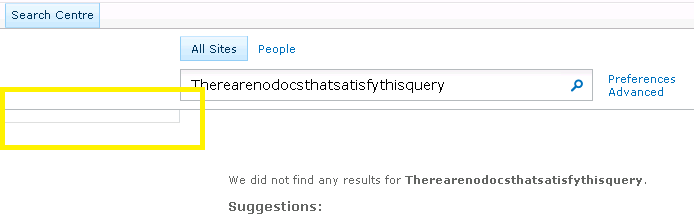
If you have ever spent time customizing or even just using SharePoint's Search Center then i am sure you have seen this annoying little box that shows up when you have no refinements. It also shows up when you get no results back from a query like this:

So, what is this? You may ask...Well it is the border of the Refinement Panel DIV which has padding-bottom: 5px and padding-top: 7px and it looks good when there are refinement items but not so much when it is empty...

Well that's great but what can we do?
Well, if you already have a JavaScript file and a jQuery refference, then throw this in there and it will hide it when it is blank...
 function HideEmptyRefiner() {  
      if ( $('.ms-searchref-main').children().length == 0 ) {    
        $('.ms-searchref-main').hide();   
      }  
 }  
_spBodyOnLoadFunctionNames.push('HideEmptyRefiner');  

So, what if you don't want to run jQuery on your site? Well don't worry i won't leave you hanging...you can achieve the same result with plain old JavaScript but as always it is 10 times harder!

I am not going to go into the details (you can find those here on this great blog about the issue) but you have to be careful on how you look to see if there are any childNodes. You can't just do a simple parent.childNodes.length because SharePoint was so kind as to leave a nice little XML comment in this DIV:
 <!-- l version="1.0" encoding="utf-8 -->  

Further more, the childNodes length count is not always consistent cross-browser

So, by using the knowledge gained from the blog above and his example as a starting point this is what i came up with...
 var kids;  
 var realKids;  
 var parent;  
 var i = 0;  
 function hideEmptySearchDiv() {  
   realKids = 0;  
   parent = document.getElementById("SRCHREF");  
   kids = parent.childNodes.length;  
   while (i < kids) {  
     if (parent.childNodes[i].nodeType != 3 && parent.childNodes[i].nodeType != 8) {  
       realKids++;  
     }  
     i++;  
   }  
   if (realKids == 0) {  
     parent.style.display = 'none';  
   }  
 }  
 _spBodyOnLoadFunctionNames.push('hideEmptySearchDiv');  

I found that the nodeType of the comment was 8 so I excluded that, then applied the same "if none found hide the div" logic as I used in my jQuery example above.

Enjoy! I hope this helps some one.

Thursday, June 14, 2012

Use SharePoint 2010 JavaScript (ECMAScript) Client Object Model to check current users permissions

The JavaScript Object Model is a very powerful tool to a SharePoint Developer if you know how to use it properly. Unfortunately there isn't that much information out there about it and searching for examples often leads you to C# style SharePoint Object Model code which is similar but not the same...

If you are new to it and want to learn more or play around with some working examples check these out!

I struggled to get this to work for longer than I would like to admit so I thought I would post it here to alleviate future headaches and in hopes that it helps someone else.

My requirement was to check the permission of the current user using The JavaScript Client Object Model and do "something"

So here is what I ended up with.

 <script type='text/javascript'>  
  ExecuteOrDelayUntilScriptLoaded(checkifUserHasEditListItems, "sp.js");  
 function checkifUserHasEditListItems ()   
 {  
  context = new SP.ClientContext.get_current();  
  web = context.get_web();  
  this._currentUser = web.get_currentUser();  
  context.load(this._currentUser);  
  context.load(web,'EffectiveBasePermissions');  
  context.executeQueryAsync(Function.createDelegate(this, this.onSuccessMethod), Function.createDelegate(this, this.onFailureMethod));  
 }  
 function onSuccessMethod(sender, args)   
 {  
  if (web.get_effectiveBasePermissions().has(SP.PermissionKind.editListItems))  
  alert('User has editListItems');  
  else  
  alert('no dice');  
 }  
 </script>  


You can dump this in a CEWP or include it in a .js file that you already have...either way it will prompt you with an alert (obviously the alert is just a placeholder for wonderful things to come)