Showing posts with label SP2010. Show all posts

Friday, July 27, 2012

SharePoint 2010 Event ID 6482 Application Server Administration job failed for service instance Microsoft.Office.Server.Search.Administration.SearchServiceInstance

Have you ever seen this error in your ULS and wondered what it was?

SharePoint 2010 Event ID 6482 Application Server Administration job failed for service instance Microsoft.Office.Server.Search.Administration.SearchServiceInstance
I used to always ignore it because although it showed up once a minute in the logs SharePoint Search worked fine.


I got curious about it and decided to do some digging which lead me to this great article by Jeff DeVerter that explained what the issue was and how to resolve it.


And now thanks to Jeff, my ULS has been error free for 3 days!

Monday, July 16, 2012

SharePoint 2010: No Site Content Types Link

One of the most discuraging issues you will find when working with Content Types in SharePoint is a very simple issue. The Site Content Types link in the breadcrumb is not a link at all. Instead it is some grayed out text that irritates you every time you try an click on it.

So I got tired of trying to do this and thought I would take matters into my own hands.

Here is what I came up with:
function AddContentTypeLink() { 
   var spans = document.getElementsByTagName('h2'); 
   var stringToMatch = ' Site Content Types '; 
   for (var i = 0; i < spans.length; ++i) { 
     if (spans[i].innerHTML.indexOf(stringToMatch) != -1) { 
       spans[i].innerHTML = spans[i].innerHTML.replace(stringToMatch ,"<a href='/_layouts/mngctype.aspx'>" + stringToMatch + "</a>"); 
       break;
     }
   }
 }
 _spBodyOnLoadFunctionNames.push('AddContentTypeLink');

Add this to an existing JavaScript file you have on the go (or in a CEWP on the settings pages where it exists if you are desperate)

If all worked properly you should be left with this:

It may not be pretty but it works well...

If you are working in a different language you can change the string variable to whatever it translates to (French for example is " Types de contenu de site " (don't forget the leading and trailing space!)

Saturday, July 7, 2012

SharePoint 2010 Search Refinement Panel - Bad Border

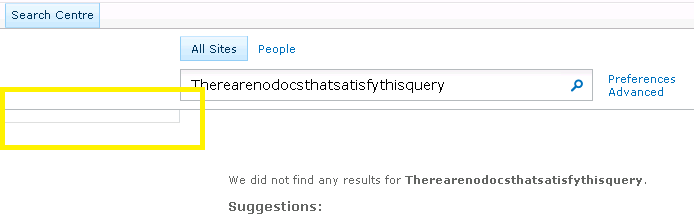
If you have ever spent time customizing or even just using SharePoint's Search Center then i am sure you have seen this annoying little box that shows up when you have no refinements. It also shows up when you get no results back from a query like this:

So, what is this? You may ask...Well it is the border of the Refinement Panel DIV which has padding-bottom: 5px and padding-top: 7px and it looks good when there are refinement items but not so much when it is empty...

Well that's great but what can we do?
Well, if you already have a JavaScript file and a jQuery refference, then throw this in there and it will hide it when it is blank...
 function HideEmptyRefiner() {  
      if ( $('.ms-searchref-main').children().length == 0 ) {    
        $('.ms-searchref-main').hide();   
      }  
 }  
_spBodyOnLoadFunctionNames.push('HideEmptyRefiner');  

So, what if you don't want to run jQuery on your site? Well don't worry i won't leave you hanging...you can achieve the same result with plain old JavaScript but as always it is 10 times harder!

I am not going to go into the details (you can find those here on this great blog about the issue) but you have to be careful on how you look to see if there are any childNodes. You can't just do a simple parent.childNodes.length because SharePoint was so kind as to leave a nice little XML comment in this DIV:
 <!-- l version="1.0" encoding="utf-8 -->  

Further more, the childNodes length count is not always consistent cross-browser

So, by using the knowledge gained from the blog above and his example as a starting point this is what i came up with...
 var kids;  
 var realKids;  
 var parent;  
 var i = 0;  
 function hideEmptySearchDiv() {  
   realKids = 0;  
   parent = document.getElementById("SRCHREF");  
   kids = parent.childNodes.length;  
   while (i < kids) {  
     if (parent.childNodes[i].nodeType != 3 && parent.childNodes[i].nodeType != 8) {  
       realKids++;  
     }  
     i++;  
   }  
   if (realKids == 0) {  
     parent.style.display = 'none';  
   }  
 }  
 _spBodyOnLoadFunctionNames.push('hideEmptySearchDiv');  

I found that the nodeType of the comment was 8 so I excluded that, then applied the same "if none found hide the div" logic as I used in my jQuery example above.

Enjoy! I hope this helps some one.

Wednesday, July 4, 2012

SharePoint 2010: Value does not fall within the expected range

Today I was working on a very annoying issue related to some custom code we are using to look-up information from a list.


All of a sudden when logged in as a non-Site Collection Administrator (Site Owner) our code was erroring out on this line:
 SPFieldUserValueCollection siteContacts = new SPFieldUserValueCollection(web, item["Site Contacts"].ToString());  


The error was basically saying that the 'Site Contacts' field did not exist in the list even tough it did.


Come to find out that this issue was not related to the list at all but rather the way that SharePoint gets list items. It does it in a CAML Query type of way thus the list item threshold of 8 columns applies and this column was magic number 9.


So because the list item threshold does not apply to Site Collection Admins the look-up worked fine for them but not for anyone else.


Lesson learned, increase the List View Threshold, perform a specific query on the list using SPQuery and specify less than 8 ViewFields something like this or override the limit like this:
 query.QueryThrottleMode = SPQueryThrottleOption.Override  


Or, in our case, we took a different (3rd) approach.


You can disable the throttling on a list by list basis so we opted for this PowerShell script:
 $web = Get-SPWeb http://your.site.com  
 $list = $web.Lists["My List"]   
 $list.EnableThrottling = $false  
 $list.Update()  


We knew this 'special' list is not going to get out of hand and we didn't want to change the threshold for the whole web application.

Wednesday, June 27, 2012

list.Fields["Internal Name"] does not exist

Got a quick and dirty one for you.

A co-worker of mine came to me with a simple but weird issue.
This chunk of code wasn't working:

 string property = "DocumentSetDescription";  
 if (list.Fields.ContainsField(property))  
 {  
   if (list.Fields[property].Type == SPFieldType.Invalid)  
   {  
     //Code Here  
   }  
 }  

But it was throwing an error on the second 'if' statement basically saying the Field did not exist.

So you would think that if the first if statement was true then the second must be OK as well but it wasn't.

Come to find out it has to do with the way that the SPList.Fields Property looks up fields.

if you use .Fields.ContainsField(value) it looks it up by the internal name of the field (which were had) but if you use .Fields[value] it tries to look it up by either the GUID, DisplayName or the iIndex.

So if you try to look up a column by the Internal Name and it isn't the same as the Display Name then it will fail.

In order to avoid this we refined the if statement to be more like this:

 string property = "DocumentSetDescription";  
 if (list.Fields.ContainsField(property))  
 {  
   if (list.Fields.GetFieldByInternalName(property).Type == SPFieldType.Invalid)  
   {  
     //Code Here  
   }  
 }  

You learn something new every day...

Thursday, June 7, 2012

SharePoint 2010 Custom Search Refiner for Contentclass

My client pointed out Yaroslav Pentsarskyy's post on Search Refiners last week and asked me to look into it.
So I implemented his solution and although it worked well, my client and I wanted more granularity for this search refiner, so I got to thinking that one thing that would work well would be the ContentClass property that holds such values as STS_Site and STS_ListItem_Announcement etc.


So I dusted off my XML Editor, cracked open the FilterCategories from the Refinement Panel (don't forget to un-check use default configuration, and went to work and here is what I ended up with:
<Category
   Title="Content Class"
   Description="Filter by contentclass"
   Type="Microsoft.Office.Server.Search.WebControls.ManagedPropertyFilterGenerator"
   MetadataThreshold="0"
   NumberOfFiltersToDisplay="2"
   MaxNumberOfFilters="0"
   SortBy="Custom"
   ShowMoreLink="True"
   MappedProperty="contentclass"
   MoreLinkText="show more"
   LessLinkText="show fewer" >
   <CustomFilters MappingType="ValueMapping"
     DataType="String"
     ValueReference="Absolute"
     ShowAllInMore="False">
     <CustomFilter CustomValue="Web Pages">
       <OriginalValue>STS_ListItem_WebPageLibrary</OriginalValue>
     </CustomFilter>
     <CustomFilter CustomValue="Announcements">
       <OriginalValue>STS_ListItem_Announcements</OriginalValue>
     </CustomFilter>
     <CustomFilter CustomValue="Contacts">
       <OriginalValue>STS_ListItem_Contacts</OriginalValue>
     </CustomFilter>
     <CustomFilter CustomValue="Disucssions">
       <OriginalValue>STS_ListItem_DiscussionBoard</OriginalValue>
     </CustomFilter>
     <CustomFilter CustomValue="Documents">
       <OriginalValue>STS_ListItem_DocumentLibrary</OriginalValue>
     </CustomFilter>
     <CustomFilter CustomValue="Events">
       <OriginalValue>STS_ListItem_Events</OriginalValue>
     </CustomFilter>
     <CustomFilter CustomValue="Gantt Tasks">
       <OriginalValue>STS_ListItem_GanttTasks</OriginalValue>
     </CustomFilter>
     <CustomFilter CustomValue="List Items">
       <OriginalValue>STS_ListItem_GenericList</OriginalValue>
     </CustomFilter>
     <CustomFilter CustomValue="Links">
       <OriginalValue>STS_ListItem_Links</OriginalValue>
     </CustomFilter>
     <CustomFilter CustomValue="Pictures">
       <OriginalValue>STS_ListItem_PictureLibrary</OriginalValue>
     </CustomFilter>
     <CustomFilter CustomValue="Surveys">
       <OriginalValue>STS_ListItem_Survey</OriginalValue>
     </CustomFilter>
     <CustomFilter CustomValue="Tasks">
       <OriginalValue>STS_ListItem_Tasks</OriginalValue>
     </CustomFilter>
     <CustomFilter CustomValue="XML Forms">
       <OriginalValue>STS_ListItem_XMLForm</OriginalValue>
     </CustomFilter>
     <CustomFilter CustomValue="Sites">
       <OriginalValue>STS_Web</OriginalValue>
     </CustomFilter>
   </CustomFilters>
 </Category>
Note: if you are concerned about Multilingualism then know that by telling the Refinement Panel Web Part to not use the default configuration you are hard-wiring a bunch of words that are used here (like 'show more' and 'show less') so keep that in mind.


Thanks again to Yaroslav Pentsarskyy for the mention on his new post about my resolution after I sent it to him.